


Intelligent Assistant
Chat with our virtual assistant to get answers promptly.
Cloud Testing had been removed in Asia, Africa, and Latin America on June 30, 2023. Currently, it is available only in China, Europe, and Russia.
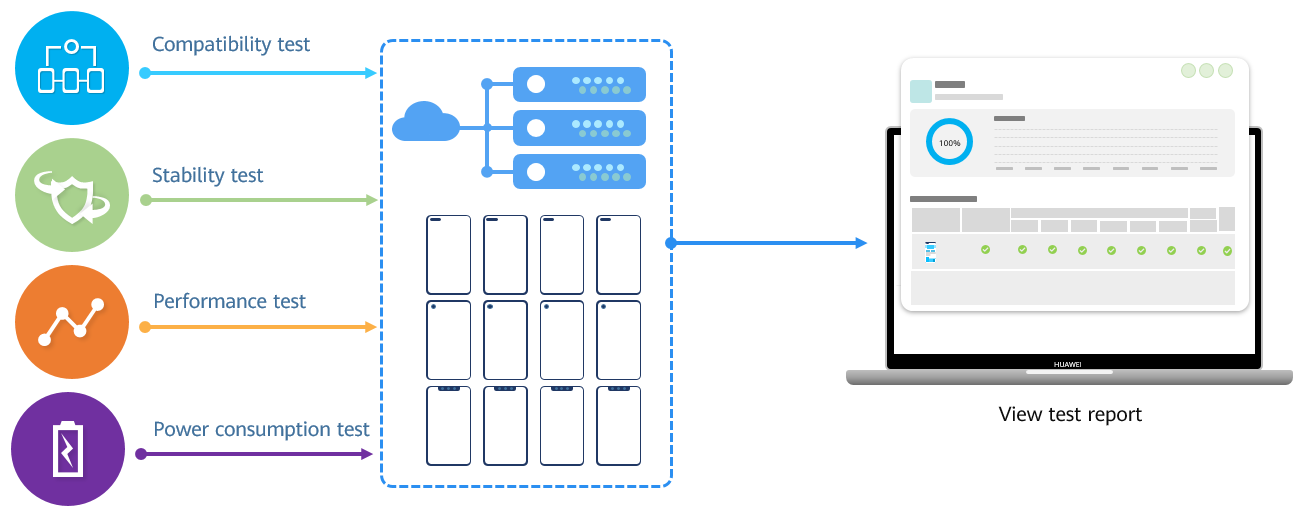
Cloud Testing is dedicated to providing you with easy-to-use one-stop mobile app test services. It provides advanced technologies for you to conduct tests more efficiently at much lower costs during mobile app development and testing, to ensure that your app provides premium user experience on Huawei devices. The service allows you to test the compatibility, stability, performance, and power consumption of your app on mainstream Huawei mobile devices. After a test, you can obtain professional and detailed test reports in a timely manner, to help you detect problems in your app prior to the app release. |
Function | Description |
|---|---|
Cloud Testing allows compatibility tests of your app on diverse real devices. The test automatically detects compatibility issues, including exceptions during app installation/reinstallation/uninstallation/launches, crashes, application not responding (ANR) problems, unexpected exit, running errors, account errors, black/white screen issues, and exit failures. | |
In a stability test, traversal testing and random testing are performed to detect app stability issues such as the memory leak, memory overwriting, screen freezing, and crashes on Huawei mobile devices. | |
The performance test in Cloud Testing collects performance data of real devices, such as, CPU usage, memory usage, power consumption, and traffic, and analyzes app performance defects in depth. | |
In the power consumption test, you can check key indicators and determine how your app affects the power consumption of devices. |
During the compatibility, stability, performance, and power consumption tests, you can select Huawei devices by device model or Android version. After you submit a test application, selected devices will be located over the cloud for test execution, to generate test reports on compatibility, stability, performance, and power consumption.
Platform | Supported |
|---|---|
Android |
|
iOS |
|
Web |
|
Quick app |
|
Server SDK | N/A |
REST API | N/A |
Cross-platform framework | N/A |
This section describes the implementation processes of the compatibility test, stability test, performance test, and power consumption test.
No. | Step | Details |
|---|---|---|
1 | Select a test type | Create a compatibility test. |
2 | Upload an app | Upload the app package to be tested to Cloud Testing. |
3 | (Optional) Set preset content | Preset account information or customize actions as required. |
4 | Select test devices | Select one or more device models for the test. |
5 | Confirm usage details | Confirm and submit the duration and balance required for the test. |
6 | Submit the test | Submit the compatibility test application. |
7 | Perform the test | The app to be tested is submitted for testing on the selected devices. |
8 | View the test report | After the test is complete, view the test report of your app. |
No. | Step | Details |
|---|---|---|
1 | Select a test type | Create a stability test. |
2 | Upload an app | Upload the app package to be tested to Cloud Testing. |
3 | Select test devices | Select one or more device models for the test. |
4 | Confirm usage details | Confirm and submit the duration and balance required for the test. |
5 | Submit the test | Submit the stability test application. |
6 | Perform the test | The app to be tested is submitted for testing on the selected devices. |
7 | View the test report | After the test is complete, view the test report of your app. |
No. | Step | Details |
|---|---|---|
1 | Select a test type | Create a performance test. |
2 | Upload an app | Upload the app package to be tested to Cloud Testing. |
3 | (Optional) Set preset content | Preset account information or customize actions as required. |
4 | Select an app category | Select an app category. |
5 | Select test devices | Select one or more device models for the test. |
6 | Confirm usage details | Confirm and submit the duration and balance required for the test. |
7 | Submit the test | Submit the performance test application. |
8 | Perform the test | The app to be tested is submitted for testing on the selected devices. |
9 | View the test report | After the test is complete, view the test report of your app. |
No. | Step | Details |
|---|---|---|
1 | Select a test type | Create a power consumption test. |
2 | Upload an app | Upload the app package to be tested to Cloud Testing. |
3 | Select an app category | Select an app category. |
4 | Select test devices | Select one or more device models for the test. |
5 | Confirm usage details | Confirm and submit the duration and balance required for the test. |
6 | Submit the test | Submit the power consumption test application. |
7 | Perform the test | The app to be tested is submitted for testing on the selected devices. |
8 | View the test report | After the test is complete, view the test report of your app. |