


Intelligent Assistant
Chat with our virtual assistant to get answers promptly.
The real-time translation service can translate text from the source language into the target language through the server on the cloud. Currently, real-time translation supports 62 languages. For details, please refer to Languages Supported by Translation.
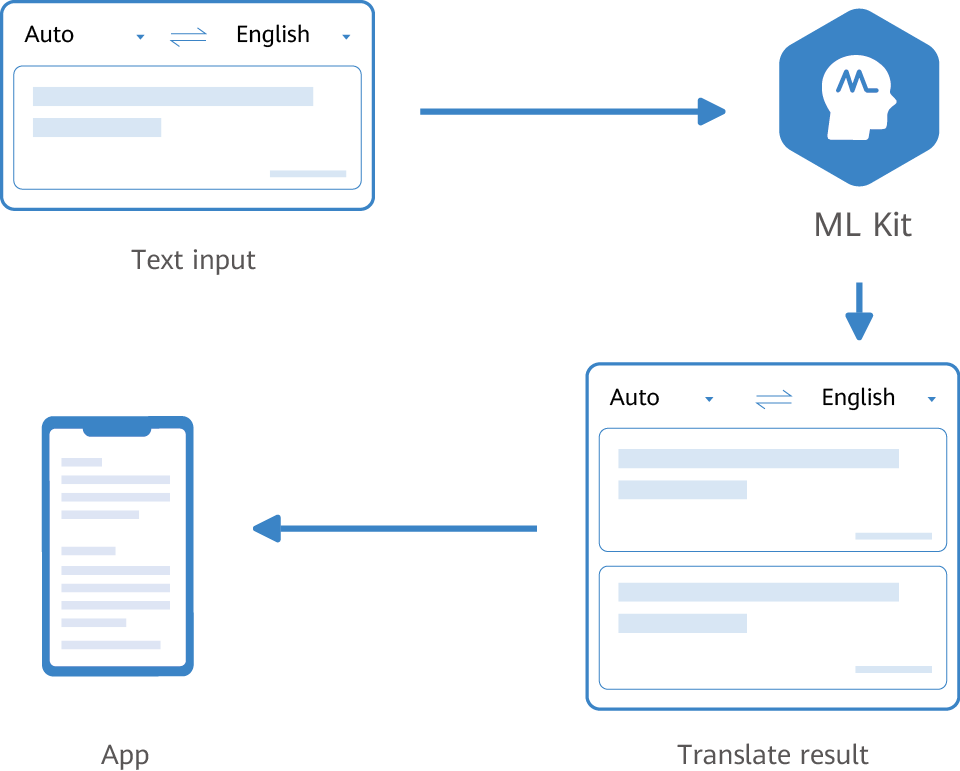
Delivers translation in real time to users when they are browsing web pages in foreign language, helping them acquire the information they want.
Quickly translates text in images of usage instructions, menus, contracts, textbooks, and more, which is helpful for users traveling, studying, and working abroad.
Helps users speaking different languages communicate with each other in, for example, working, studying, and entertainment, to improve the communication efficiency and quality.
Allows for uploading a customized glossary to further optimize the translation result.
Supports direct translation from or to Chinese for the following languages: Japanese, German, French, and Russian. In this way, the real-time translation service can offer better results in less time. The direct MT system won the first place in the Russian-Chinese shared task of the 2021 Sixth Conference on Machine Translation (WMT21).
Provides response in milliseconds throughout the translation service, smoothly delivering the translation result. The service now is deployed in four major sites around the world to help you expand overseas market for your product.
Depends on advanced MT technology and utilizes big data drawn from various industries, to satisfy user needs in different fields and scenarios. This service won the first place in the Mandarin-English subtitle translation contest in the International Conference on Spoken Language Translation (IWSLT 2020).
The real-time translation service requires a network connection. If the network is unavailable, you can integrate the on-device translation service.
Before app development, you need to make necessary development preparations, configure the Maven repository address for the HMS Core SDK, and integrate the real-time translation SDK.
// Create a text translator using custom parameter settings.
MLRemoteTranslateSetting setting = new MLRemoteTranslateSetting
    .Factory()
    // Set the source language code. The BCP-47 standard is used for Traditional Chinese, and the ISO 639-1 standard is used for other languages. This parameter is optional. If this parameter is not set, the system automatically detects the language.
    .setSourceLangCode("zh")
   // Set the target language code. The BCP-47 standard is used for Traditional Chinese, and the ISO 639-1 standard is used for other languages.
    .setTargetLangCode("en")
    .create();
MLRemoteTranslator mlRemoteTranslator = MLTranslatorFactory.getInstance().getRemoteTranslator(setting);
// Create a text translator using custom parameter settings.
val setting = MLRemoteTranslateSetting.Factory() // Set the source language code. The BCP-47 standard is used for Traditional Chinese, and the ISO 639-1 standard is used for other languages. This parameter is optional. If this parameter is not set, the system automatically detects the language.
.setSourceLangCode("zh") // Set the target language code. The BCP-47 standard is used for Traditional Chinese, and the ISO 639-1 standard is used for other languages.
.setTargetLangCode("en")
.create()
val mlRemoteTranslator = MLTranslatorFactory.getInstance().getRemoteTranslator(setting)MLTranslateLanguage.getCloudAllLanguages().addOnSuccessListener(
new OnSuccessListener<Set<String>>() {
@Override
public void onSuccess(Set<String> result) {
// Languages supported by real-time translation are successfully obtained.
}
});MLTranslateLanguage.getCloudAllLanguages().addOnSuccessListener {
}try {
Set<String> result = MLTranslateLanguage.syncGetCloudAllLanguages();
// Languages supported by real-time translation are successfully obtained.
} catch (MLException e) {
// Catch exceptions on languages supported for real-time translation.
}try {
val result = MLTranslateLanguage.syncGetCloudAllLanguages()
// Languages supported by real-time translation are successfully obtained.
} catch (e: MLException) {
// Catch exceptions on languages supported for real-time translation.
}Do not use the synchronous method directly in the UI thread because it involves network requests.
// sourceText: text to be translated, with up to 5000 characters.
final Task<String> task = mlRemoteTranslator.asyncTranslate(sourceText);
task.addOnSuccessListener(new OnSuccessListener<String>() {
    @Override
     public void onSuccess(String text) {
       // Processing logic for recognition success.
   }
}).addOnFailureListener(new OnFailureListener() {
     @Override
     public void onFailure(Exception e) {
       // Processing logic for recognition failure.
         try {
             MLException mlException = (MLException)e;
            // Obtain the result code. You can process the result code and customize respective messages displayed to users.
             int errorCode = mlException.getErrCode();
             // Obtain the error information. You can quickly locate the fault based on the result code.
             String errorMessage = mlException.getMessage();
         } catch (Exception error) {
           // Handle the conversion error.
         }
     }
 });
// sourceText: text to be translated, with up to 5000 characters.
val task = mlRemoteTranslator!!.asyncTranslate(sourceText)
task.addOnSuccessListener {
// Processing logic for detection success.
}.addOnFailureListener { e ->
// Processing logic for detection failure.
try {
val mlException = e as MLException
// Obtain the result code. You can process the result code and customize respective messages displayed to users.
val errorCode = mlException.errCode
// Obtain the error information. You can quickly locate the fault based on the result code.
val errorMessage = mlException.message
} catch (error: Exception) {
// Handle the conversion error.
}
}try {
String output = mlRemoteTranslator.syncTranslate(sourceText);
// Processing logic for recognition success.
} catch (MLException e) {
// Processing logic for detection failure.
// Obtain the result code. You can process the result code and customize respective messages displayed to users.
int errorCode = e.getErrCode();
// Obtain the error information. You can quickly locate the fault based on the result code.
String errorMessage = mlException.getMessage();
}try {
val output = mlRemoteTranslator.syncTranslate(sourceText)
// Processing logic for detection success.
} catch (e: MLException) {
// Processing logic for recognition failure.
// Obtain the result code. You can process the result code and customize respective messages displayed to users.
val mlException: MLException? = null
val errorCode = e!!.errCode
// Obtain the error information. You can quickly locate the fault based on the result code.
val errorMessage = mlException.message
}Do not use the synchronous method directly in the UI thread because it involves network requests.